Code
The code for this project is divided into two main parts: Arduino code, which controls the assembly and performs tracking calculations, and JavaScript code, which facilitates connection to the ESP32 via Bluetooth and enables data transmission between the device and a web interface. The most current version of the code is always available here, the Arduino Code is in ESP32/src and the Web app in public. This overview will omit basic setup procedures such as initializing sensors and motors.
Arduino
To track the satellite, I've developed several functions. For now, we will skip the Bluetooth functionality, which will be discussed later. Initially, it's necessary to "home" both stepper motors to determine their starting positions, as they lack initial orientation upon startup. The homing function requires four parameters: a pin number for the hall effect sensor, a reference to a stepper motor, a boolean to record the homing status, an offset to adjust the final position, and the total amount of steps the motor can take. The motor moves until the sensor reads HIGH, then continues for an additional offset distance.
void home(int pin, AccelStepper &stepper, bool &homingStatus, int offset, int totalSteps)
{
  Serial.println("Starting homing process...");

  if (deviceConnected)
  {
    pCombinedCharacteristic->setValue("Homing");
    pCombinedCharacteristic->notify();
  }

  // Check the initial state of the sensor
  bool sensorState = digitalRead(pin);
  Serial.print("Initial sensor state: ");
  Serial.println(sensorState ? "HIGH" : "LOW");

  // Start blinking the LED during the homing process
  timerLed.start();

  // Move the stepper motor until the sensor state changes to LOW
  if (sensorState == HIGH)
  {
    Serial.println("Moving to find LOW...");
    stepper.move(totalSteps);
    while (digitalRead(pin) == HIGH)
    { // Wait until we find LOW state
      stepper.run();
      timerLed.update();
    }
    Serial.println("LOW state found.");
  }

  // After finding LOW, continue to move until we find HIGH again
  stepper.move(totalSteps);
  Serial.println("Moving to find HIGH...");
  while (digitalRead(pin) == LOW)
  { // Now wait until it reads HIGH again
    stepper.run();
    timerLed.update();
  }

  // Homing process is complete once HIGH state is found again
  timerLed.stop();
  digitalWrite(led_pin, LOW); // Ensure the LED is turned off after stopping

  Serial.println("Homing complete. Sensor state is HIGH.");
  homingStatus = true;

  if (offset != 0)
  {
    stepper.move(offset);
    while (stepper.distanceToGo() != 0)
    {
      stepper.run();
    }
  }

  stepper.setCurrentPosition(0);
}
For satellite tracking, the SGP4 library is used to calculate the satellite's position based on its Two-Line Element set (TLE), with updates occurring at specified intervals. The TickTwo library enables non-blocking function calls.
#include "TickTwo.h"
#include <Sgp4.h>
SGP4 needs the observes position and the satellite's name and TLEs.
TLE stands for Two-Line Element. It is a data format used to describe the orbits of Earth-orbiting objects, such as satellites and space debris. A TLE consists of two lines of information that provide details about the object’s current position, velocity, and other orbital parameters at a specific point in time. These elements are primarily used by tracking systems to predict the future positions of orbiting objects.
sat.site(observerLat, observerLng, 0);
sat.init(satname, tle_line1, tle_line2);
The observer's location and the satellite's TLE are initialized, and the satellite's position is updated regularly. The SGP4 algorithm calculates and returns the azimuth and elevation angles of the tracked object in degrees. The azimuth covers a full 360-degree range, while the altitude ranges from +90 degrees (directly overhead) to -90 degrees (directly beneath the horizon). For a clearer understanding, please refer to the accompanying illustration:
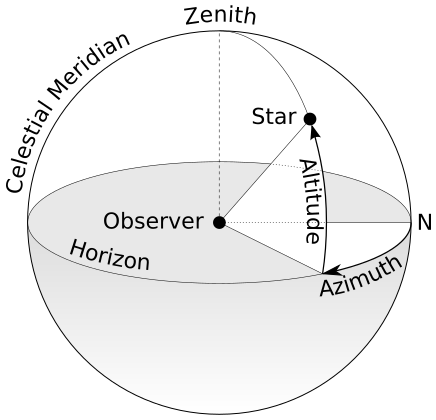
Conversion from azimuth/altitude degrees to stepper motor steps is performed to accurately position the assembly.
void track_satellite()
{
  // Update the satellite position every three seconds
  sat.findsat(unixtime);
  unixtime += 3;

  digitalWrite(led_pin, !digitalRead(led_pin));

  // Convert azimuth/altitude to stepper motor steps
  long targetStepsAz = azimuthToSteps(sat.satAz);
  long targetStepsAlt = altitudeToSteps(sat.satEl);

  // Set target position
  moveToShortestPath(stepperAz, targetStepsAz, totalSteps);
  moveToShortestPath(stepperAlt, targetStepsAlt, (stepsPerRevolutionAlt / 2));

  Serial.print(String(sat.satName) + "Azimuth: " + String(sat.satAz) + "°" + " Altitude: " + String(sat.satEl) + "°" + " Distance: " + String(sat.satDist) + " km" + " Az Steps: " + String(targetStepsAz));

  // Notify data if device is connected
  if (deviceConnected)
  {
    String combinedData = String(sat.satAz) + "," + String(sat.satEl) + "," + String(sat.satDist);
    pCombinedCharacteristic->setValue(combinedData.c_str());
    pCombinedCharacteristic->notify();
    Serial.print(" (New data notified)");
  }
  Serial.println();
}
To calculate the number of steps needed for rotation, the total steps are derived from the motor's full rotation steps and the gear ratio (if a gear is used). For the altitude we first have to map our range from [-90, 90] to [0, 180]. A function then determines the shortest path to the target position, considering the current orientation and desired endpoint.
const int gearRatio = 5;
const int stepsPerRevolutionAz = 2048;
const int stepsPerRevolutionAlt = 2320;
const int totalSteps = gearRatio * stepsPerRevolutionAz;

long azimuthToSteps(float azimuth)
{
  return long(azimuth / 360.0 * totalSteps);
}

long altitudeToSteps(float altitude)
{
  // Adjust the altitude range from [-90, 90] to [0, 180] first
  float adjustedAltitude = altitude + 90; // Now ranges from 0 to 180

  // Then map this adjusted altitude range to the stepper's step range for 180°
  return long(adjustedAltitude / 180.0 * (stepsPerRevolutionAlt / 2));
}
void moveToShortestPath(AccelStepper &stepper, long targetSteps, long axisTotalSteps)
{
  long currentSteps = stepper.currentPosition();
  long stepsToTarget = targetSteps - currentSteps;
  long stepsToTargetAbs = abs(stepsToTarget);

  // Determine if it's shorter to move forward or backward to the target position.
  // If the absolute step difference is less than or equal to half the steps of a full circle,
  // then moving forward is shorter. Otherwise, moving backward is shorter.
  bool moveForward = stepsToTargetAbs <= (axisTotalSteps / 2);

  long shortestSteps;
  if (moveForward)
  {
    // If moving forward is shorter, then we use the direct step difference.
    shortestSteps = stepsToTarget;
  }
  else
  {
    // If moving backward is shorter, we need to determine whether to add or subtract
    // a full circle of steps to find the shortest path.
    if (stepsToTarget > 0)
    {
      // If the target is ahead (positive stepsToTarget), move backward by subtracting a full circle.
      shortestSteps = stepsToTarget - axisTotalSteps;
    }
    else
    {
      // If the target is behind (negative stepsToTarget), move forward by adding a full circle.
      shortestSteps = stepsToTarget + axisTotalSteps;
    }
  }
  stepper.move(shortestSteps);
}
A timer object is created to periodically invoke the tracking function without delaying the main loop.
TickTwo timerSat(track_satellite, 3000, 0);
This timer needs to be started once and updated constantly in the loop function.
timerSat.start();

void loop()
{
  timerSat.update();
}
We also need to run the motor in the loop function to actually move it.
void loop()
{
 if (stepperAz_homed)
  {
    stepperAz.run(); // This will move the stepper motor according to the previously set target position
  }

 if (stepperAlt_homed)
  {
    stepperAlt.run();
  }
}
This is basically it for the tracking functionality.
Bluetooth
The Bluetooth functionality requires the BLEDevice library and several global variables for managing connections and data transmission.
#include <BLEDevice.h>
#include <BLEServer.h>
#include <BLEUtils.h>
#include <BLE2902.h>
BLEServer *pServer = NULL;
BLECharacteristic *pCombinedCharacteristic = NULL;
BLECharacteristic *pSatelliteCharacteristic = NULL;
bool deviceConnected = false;
bool oldDeviceConnected = false;
pServer: Pointer to the BLEServer object.pCombinedCharacteristic:Pointer to the BLECharacteristic for reading/sending tracking data.pLedCharacteristic: Pointer to the BLECharacteristic for reading/sending satellite data.deviceConnected: A boolean variable to track whether a BLE device is connected.oldDeviceConnected: A boolean variable to track the previous connection status.
Set the UUIDs for the Service and Characteristics. Those UUIDs were created using the uuidgenerator website.
#define SERVICE_UUID "62f7be24-e415-4c1a-82d4-1ded72026831"
#define COMBINED_CHARACTERISTIC_UUID "b3447ef6-076f-4500-bf45-0212800cab84"
#define SATELLITE_CHARACTERISTIC_UUID "3cbea1e3-879b-4e47-b115-d44700de5db8"
Then several callback functions are created. The MyServerCallbacks defines a callback function for device connection and disconnection events. In this case, we change the value of the deviceConnected variable to true or false depending on the connection state.
class MyServerCallbacks : public BLEServerCallbacks
{
  void onConnect(BLEServer *pServer)
  {
    deviceConnected = true;
  };

  void onDisconnect(BLEServer *pServer)
  {
    deviceConnected = false;
  }
};
The MySatelliteCharacteristicCallbacks defines a callback function to read the value of a characteristic when it changes. This will basically receive the satellite data needed for tracking, which is the users current time, location and the satellites TLEs. This data will be assigned to various variables and the data received flag will be set to true.
class MySatelliteCharacteristicCallbacks : public BLECharacteristicCallbacks
{
  void onWrite(BLECharacteristic *pSatelliteCharacteristic)
  {
    std::string receivedData = pSatelliteCharacteristic->getValue();
    if (receivedData.length() > 0)
    {
      Serial.println("Received data:");

      // Convert the std::string to a C string (null-terminated)
      const char *dataCString = receivedData.c_str();

      // Use strtok to split the data into lines
      const char *delimiter = "\n";
      char *line = strtok((char *)dataCString, delimiter);

      // We expect 6 lines of data: Unix Time, Latitude, Longitude, Satellite Name, TLE Line 1, TLE Line 2
      String dataLines[6];
      int lineIndex = 0;

      for (lineIndex = 0; line != NULL && lineIndex < 6; ++lineIndex)
      {
        dataLines[lineIndex] = line;    // Store the line in the corresponding position
        line = strtok(NULL, delimiter); // Get the next line
      }

      // Now dataLines array contains all the parsed lines
      if (lineIndex == 6)
      { // Check if we have all 6 lines
        Serial.println("Unix Time: " + dataLines[0]);
        Serial.println("Latitude: " + dataLines[1]);
        Serial.println("Longitude: " + dataLines[2]);
        Serial.println("Satellite Name: " + dataLines[3]);
        Serial.println("TLE Line 1: " + dataLines[4]);
        Serial.println("TLE Line 2: " + dataLines[5]);

        // Update Unix time
        unixtime = atol(dataLines[0].c_str());

        // Update observer's location
        observerLat = dataLines[1].toDouble();
        observerLng = dataLines[2].toDouble();

        // Update satellite name and TLE lines
        strncpy(satname, dataLines[3].c_str(), sizeof(satname));
        strncpy(tle_line1, dataLines[4].c_str(), sizeof(tle_line1));
        strncpy(tle_line2, dataLines[5].c_str(), sizeof(tle_line2));

        newDataReceived = true;
        Serial.println("Satellite tracking data updated.");
      }
      else
      {
        Serial.println("Incomplete data received.");
      }
    }
  }
};
In the setup() we will have to Initialize the ESP32 as BLE device called ESP32. Then, create a BLE server and set its callbacks for connection and disconnection.
BLEDevice::init("ESP32");

pServer = BLEDevice::createServer();
pServer->setCallbacks(new MyServerCallbacks());
Create a BLE service with the UUID we’ve defined earlier.
BLEService *pService = pServer->createService(SERVICE_UUID);
Create a BLE characteristics (inside the service we just created) and set its properties (read, write, notify, indicate).
pCombinedCharacteristic = pService->createCharacteristic(
    COMBINED_CHARACTERISTIC_UUID,
    BLECharacteristic::PROPERTY_READ | BLECharacteristic::PROPERTY_WRITE | BLECharacteristic::PROPERTY_NOTIFY | BLECharacteristic::PROPERTY_INDICATE);

pSatelliteCharacteristic = pService->createCharacteristic(
    SATELLITE_CHARACTERISTIC_UUID,
    BLECharacteristic::PROPERTY_WRITE);
Register the callback, so that we detect when a new value was written on that characteristic.
pSatelliteCharacteristic->setCallbacks(new MySatelliteCharacteristicCallbacks());
Then add a BLE descriptor (BLE2902) to both characteristics. All that's left is to start the BLE service and start advertising.
pCombinedCharacteristic->addDescriptor(new BLE2902());
pSatelliteCharacteristic->addDescriptor(new BLE2902());

pService->start();

BLEAdvertising *pAdvertising = BLEDevice::getAdvertising();
pAdvertising->addServiceUUID(SERVICE_UUID);
pAdvertising->setScanResponse(false);
pAdvertising->setMinPreferred(0x0);
BLEDevice::startAdvertising();
Serial.println("Waiting for a client connection to notify...");
In the loop we check If a device disconnects and oldDeviceConnected is true, it restarts advertising and logs a message. This also uses the timer function to not block the code with delays. If a device connects and oldDeviceConnected is false, it logs a message.
if (!deviceConnected && oldDeviceConnected)
{
  Serial.println("Device disconnected.");
  timerAdv.start();
  oldDeviceConnected = deviceConnected;
}


if (deviceConnected && !oldDeviceConnected)
{
  oldDeviceConnected = deviceConnected;
  Serial.println("Device Connected");
}
When we receive new satellite data we start homing or tracking immediately.
if (newDataReceived)
{
  if (timerSat.state())
  {
    timerSat.stop();
  }

  if (!stepperAz_homed)
  {
    home(hall_sensor_pin1, stepperAz, stepperAz_homed, 150);
  }

  newDataReceived = false; // Reset the flag
  sat.site(observerLat, observerLng, 0);
  sat.init(satname, tle_line1, tle_line2);
  timerSat.start();
  Serial.println("Satellite tracking started with new data.");
}
To set the value of our characteristic we can do the following
pCombinedCharacteristic->setValue("Homing");
pCombinedCharacteristic->notify();
Web
The script utilizes the Web Bluetooth API to establish a connection with the ESP32 device, enabling bidirectional communication. Users can connect to, disconnect from, and send data to the device, as well as receive updates on the satellite's position.
DOM Elements
The interface comprises several HTML elements for user interaction and display of information:
connectBleButton: Button to initiate the Bluetooth connection.disconnectBleButton: Button to disconnect from the Bluetooth device.bleState: Container to display the current Bluetooth connection state.timestamp: Container to show the last update timestamp.- Additional elements display the satellite's azimuth, altitude, distance, and tracking status.
// DOM Elements
const connectButton = document.getElementById("connectBleButton");
const disconnectButton = document.getElementById("disconnectBleButton");
const bleStateContainer = document.getElementById("bleState");
const timestampContainer = document.getElementById("timestamp");

const trackButton = document.getElementById("trackButton");
const satelliteInput = document.getElementById("satelliteInput");
const satelliteSentContainer = document.getElementById("satelliteSent");

const retrievedAzimuth = document.getElementById("valueContainerAzimuth");
const retrievedAltitude = document.getElementById("valueContainerAltitude");
const retrievedDistance = document.getElementById("valueContainerDistance");
const retrievedtrackingStatus = document.getElementById(
  "valueContainerTrackingStatus"
);
BLE Device Specifications
Variables define the ESP32's Bluetooth characteristics, including the device name, service UUID, and characteristic UUIDs. These are used to filter the devices during the connection process and to identify the correct service and characteristics for communication.
var deviceName = "ESP32";
var bleService = "62f7be24-e415-4c1a-82d4-1ded72026831";
var combinedCharacteristic = "b3447ef6-076f-4500-bf45-0212800cab84";
var satelliteCharacteristic = "3cbea1e3-879b-4e47-b115-d44700de5db8";
Global Variables
Global variables store references to the BLE server, service, and characteristics, facilitating management of the Bluetooth connection and data exchange.
var bleServer;
var bleServiceFound;
var combinedCharacteristicFound;
Connection Management
The connectToDevice function initiates the Bluetooth device selection, connects to the ESP32, and subscribes to notifications from the combined characteristic. This characteristic transmits the tracking data (azimuth, altitude, distance) and the homing status.
function connectToDevice() {
  console.log("Initializing Bluetooth...");
  navigator.bluetooth
    .requestDevice({
      filters: [{ name: deviceName }],
      optionalServices: [bleService],
    })
    .then((device) => {
      console.log("Device Selected:", device.name);
      bleStateContainer.innerHTML = "Connected to device " + device.name;
      bleStateContainer.style.color = "#24af37";
      device.addEventListener("gattservicedisconnected", onDisconnected);
      return device.gatt.connect();
    })
    .then((gattServer) => {
      bleServer = gattServer;
      console.log("Connected to GATT Server");
      return bleServer.getPrimaryService(bleService);
    })
    .then((service) => {
      bleServiceFound = service;
      console.log("Service discovered:", service.uuid);
      return service.getCharacteristic(combinedCharacteristic);
    })
    .then((characteristic) => {
      console.log("Combined Characteristic discovered:", characteristic.uuid);
      combinedCharacteristicFound = characteristic;
      characteristic.addEventListener(
        "characteristicvaluechanged",
        handleCombinedCharacteristicChange
      );
      characteristic.startNotifications();
      console.log("Notifications Started.");
      return characteristic.readValue();
    })
    .catch((error) => {
      console.log("Error: ", error);
    });
}
Data Transmission and Reception
The writeSatelliteDataToCharacteristic function sends satellite tracking commands to the ESP32. It retrieves the user's current geolocation and the requested satellite's Two-Line Element (TLE) set from an external service, then transmits this data to the ESP32 for tracking.
The handleCombinedCharacteristicChange function processes incoming notifications containing tracking data, updating the web interface with the satellite's current position and tracking status.
function handleCombinedCharacteristicChange(event) {
  const value = event.target.value;
  const decodedValue = new TextDecoder().decode(value);
  console.log("Received combined value: ", decodedValue);

  if (decodedValue) {
    if (decodedValue === "Homing") {
      retrievedtrackingStatus.innerHTML = "Homing...";
    } else {
      const [azimuth, altitude, distance] = decodedValue.split(",");
      retrievedAzimuth.innerHTML = azimuth + "°";
      retrievedAltitude.innerHTML = altitude + "°";
      retrievedDistance.innerHTML = distance + " km";
      retrievedtrackingStatus.innerHTML = "Tracking...";
      timestampContainer.innerHTML = getDateTime();
    }
  }
}

function writeSatelliteDataToCharacteristic(catnr) {
  if (bleServer && bleServer.connected) {
    // Check if the Geolocation API is supported
    if ("geolocation" in navigator) {
      navigator.geolocation.getCurrentPosition(
        function (position) {
          // Success callback
          const latitude = position.coords.latitude;
          const longitude = position.coords.longitude;
          const unixTime = Date.now(); // Get the current Unix time
          console.log(
            `User's Location: Latitude: ${latitude}, Longitude: ${longitude}`
          );
          console.log(`User's Current Unix Time: ${unixTime}`);

          // Fetch the satellite data
          fetch(
            `https://celestrak.org/NORAD/elements/gp.php?CATNR=${catnr}&FORMAT=TLE`
          )
            .then((response) => response.text())
            .then((data) => {
              const tleData = data;
              console.log("Received TLE data:", tleData);
              const lines = tleData.trim().split("\n");
              const satname = lines[0];
              satelliteSentContainer.innerHTML = satname;

              // Include the user's location and Unix time in the TLE data
              const combinedData = `${unixTime}\n${latitude}\n${longitude}\n\n${tleData}`;

              return bleServiceFound
                .getCharacteristic(satelliteCharacteristic)
                .then((characteristic) => {
                  console.log(
                    "Found the Satellite characteristic: ",
                    characteristic.uuid
                  );

                  // Convert the combined data string (TLE data + location + Unix time) to a byte array for transmission
                  const encoder = new TextEncoder("utf-8");
                  const buffer = encoder.encode(combinedData);
                  return characteristic.writeValue(buffer);
                });
            })
            .then(() => {
              console.log(
                "Combined data written to Satellite characteristic:",
                catnr
              );
            })
            .catch((error) => {
              console.error(
                "Error fetching or writing combined data to the Satellite characteristic: ",
                error
              );
            });
        },
        function (error) {
          // Error callback
          console.error(
            "Error occurred while getting user's location: " + error.message
          );
        },
        {
          // Optional: Configuration object for the geolocation request
          enableHighAccuracy: false,
          timeout: 10000,
          maximumAge: 0,
        }
      );
    } else {
      console.error("Geolocation is not supported by this browser.");
    }
  } else {
    console.error(
      "Bluetooth is not connected. Cannot write to characteristic."
    );
    window.alert(
      "Bluetooth is not connected. Cannot write to characteristic. \n Connect to BLE first!"
    );
  }
}
Utility Functions
isWebBluetoothEnabled: Checks if the Web Bluetooth API is available in the user's browser.onDisconnected: Handles unexpected disconnections, attempting to reconnect to the device.disconnectDevice: Manually disconnects from the ESP32 device, stopping notifications and removing event listeners.getDateTime: Generates a timestamp string for the last data update.
function isWebBluetoothEnabled() {
  if (!navigator.bluetooth) {
    console.log("Web Bluetooth API is not available in this browser!");
    bleStateContainer.innerHTML =
      "Web Bluetooth API is not available in this browser/device!";
    return false;
  }
  console.log("Web Bluetooth API supported in this browser.");
  return true;
}

function onDisconnected(event) {
  console.log("Device Disconnected:", event.target.device.name);
  bleStateContainer.innerHTML = "Device disconnected";
  bleStateContainer.style.color = "#d13a30";
  connectToDevice();
}

function disconnectDevice() {
  console.log("Disconnect Device.");
  if (bleServer && bleServer.connected) {
    // Stop notifications and remove event listeners for the combined characteristic
    let promiseChain = Promise.resolve();
    if (combinedCharacteristicFound) {
      promiseChain = combinedCharacteristicFound
        .stopNotifications()
        .then(() => {
          combinedCharacteristicFound.removeEventListener(
            "characteristicvaluechanged",
            handleCombinedCharacteristicChange
          );
          console.log("Combined notifications stopped and listener removed.");
        });
    }

    // Disconnect the device
    promiseChain
      .then(() => bleServer.disconnect())
      .then(() => {
        console.log("Device Disconnected");
        bleStateContainer.innerHTML = "Device Disconnected";
        bleStateContainer.style.color = "#d13a30";
      })
      .catch((error) => {
        console.log("An error occurred during disconnection:", error);
      });
  } else {
    console.error("Bluetooth is not connected.");
    window.alert("Bluetooth is not connected.");
  }
}

function getDateTime() {
  var currentdate = new Date();
  var day = ("00" + currentdate.getDate()).slice(-2); // Convert day to string and slice
  var month = ("00" + (currentdate.getMonth() + 1)).slice(-2);
  var year = currentdate.getFullYear();
  var hours = ("00" + currentdate.getHours()).slice(-2);
  var minutes = ("00" + currentdate.getMinutes()).slice(-2);
  var seconds = ("00" + currentdate.getSeconds()).slice(-2);

  var datetime =
    day +
    "/" +
    month +
    "/" +
    year +
    " at " +
    hours +
    ":" +
    minutes +
    ":" +
    seconds;
  return datetime;
}